A sale in three steps.
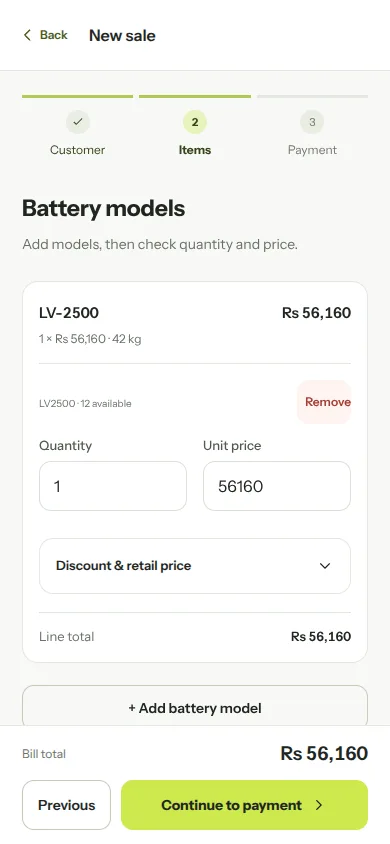
Choose the party, add batteries and record the payment. Use retail price, discount and unit price in the order you expect.
Create a mobile invoice ↗
NIZAM MOBILE
Bill banana ho ya customer ka balance dekhna ho—Nizam saath rakhein.
Sales, purchases, payments and battery claims, with the same business calculations as Nizam for Windows.
Android & iPhone · availability depends on published builds
FAMILIAR WORK. MADE FOR YOUR PHONE.
Choose the party, add batteries and record the payment. Use retail price, discount and unit price in the order you expect.
Create a mobile invoice ↗Find parties, check their ledgers and record receipts or payments. Share a statement when you need to follow up.
Check a party account ↗Receive a customer’s faulty battery, record the settlement and track the supplier’s response and recovery.
Manage mobile claims ↗Swipe through the Home summary, record expenses and open reports. Share invoice PDFs or export report data from your phone.
Explore reports ↗PHONE ONLY, OR PHONE + PC
Decide where the company lives before you start entering records.
Private company records stay on this device. Work offline while your verified license remains valid, and export backups outside the app.
Protect your records ↗Use a cloud company across devices. View downloaded records offline; connect to the internet to save changes, even with one user.
Connect phone and PC ↗Your account can stay signed in on one desktop and one mobile device together. Android and iPhone share the mobile slot.
INSTALL NIZAM MOBILE
Release availability is checked with Nizam Control. Downloading the app is free; your plan controls access inside Nizam.
Install the official APK from the download page. For updates, keep your backup and install over the existing app.
Check the download page for the current Android build.
Download Android APKOpen download page ↗Android installation guide ↗Check the published iOS build and its installation instructions. An IPA file needs a supported Apple distribution method.
Check the download page for current iPhone installation options.
View iPhone options ↗iPhone installation guide ↗THE MOBILE HANDBOOK
32 phone-specific guides, with the screen names, steps and checks you need. Start with setup or jump straight to a daily task.
Tell us your phone model, Nizam version and what you see on screen.
Contact support ↗